
Picture this: a customer sends an email about a billing problem, another reports a technical issue through your website, and someone else calls about an account question. Your support team is trying to handle everything at once. Without a central system, requests can easily get missed, duplicated, or delayed.
A Ticketing System in USA gives businesses a more organized way to manage these conversations. Instead of relying on scattered emails, spreadsheets, or chat messages, support teams can capture requests in one place, assign them to the right person, track progress, and close issues efficiently. For growing companies, this can turn a busy support operation into a structured, measurable workflow.
What Is a Ticketing System?
A ticketing system is software that converts customer or employee support requests into trackable tickets. Each ticket can contain information such as the customer’s question, issue details, priority, assigned agent, status, and communication history.
Think of a ticket as a digital case file. When a customer contacts your business, the request enters the system and receives a unique record. Your team can then follow that request from its first message through investigation, resolution, and closure.
This approach is useful for customer service, IT support, internal employee assistance, and technical support. It also creates a searchable history that teams can use when similar problems appear again.
How Does a Ticketing System Work?
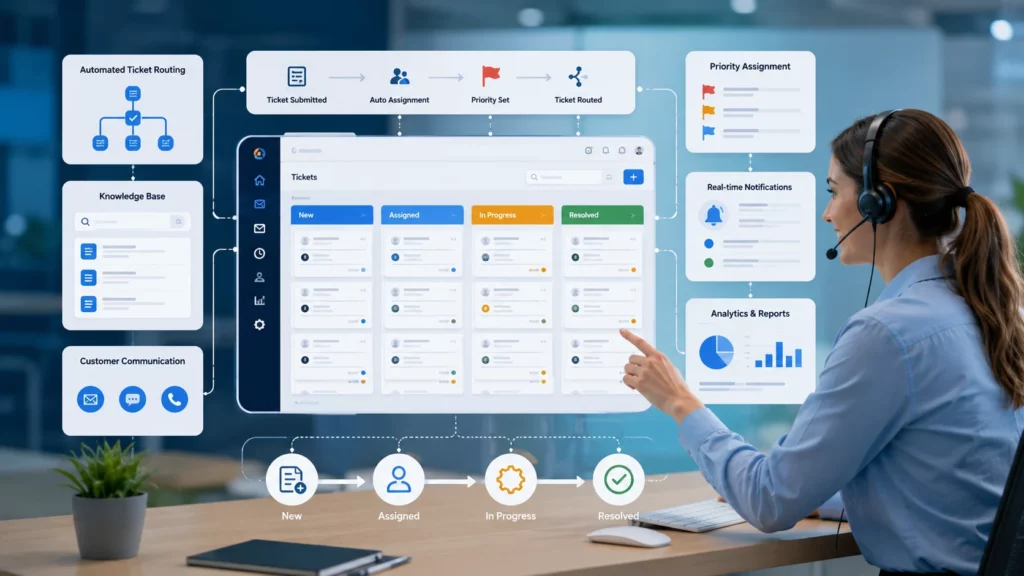
The process is usually straightforward. A customer submits a request through email, a website form, chat, or another supported channel. The system creates a ticket and records the relevant information.
Next, the ticket can be categorized and prioritized. For example, a password-reset request might receive a normal priority, while a system outage affecting hundreds of customers could be marked urgent.
The ticket is then assigned to an appropriate support agent or department. As work progresses, the status can change from open to in progress, pending, or resolved. Once the issue is fixed and the customer has received an appropriate response, the ticket can be closed.
Key Benefits of a Ticketing System in USA
1. Better Organization
Support teams often deal with dozens or hundreds of requests. A ticketing platform gives agents a central workspace where they can see what needs attention.
Instead of searching through multiple inboxes, employees can filter tickets by status, priority, department, customer, or assigned agent. This makes it easier to identify urgent issues and keep routine requests moving.
2. Faster Response and Resolution
Speed matters in customer service. Customers generally want to know that their issue has been noticed, even when the final solution requires additional investigation.
Automation can help route tickets, send acknowledgments, notify agents, and trigger reminders. These small improvements can reduce unnecessary delays and help teams maintain consistent response processes.
3. Clear Accountability
When a request is assigned to a specific person or team, everyone knows who is responsible for the next step. Managers can also see which tickets remain unresolved and where work may be getting stuck.
This creates greater accountability without requiring managers to constantly ask employees for status updates.
4. Improved Customer Experience
Customers do not want to explain the same problem repeatedly. A centralized ticket history allows support agents to review previous conversations and understand what has already happened.
For example, imagine a customer contacts support about an ongoing software problem. Instead of starting from scratch, the next agent can review the previous ticket history and continue from the existing information.
5. Useful Support Analytics
Modern systems can provide reports covering response times, resolution times, ticket volume, agent workload, customer satisfaction, and recurring issues.
These metrics help managers make informed decisions. If ticket volume consistently increases after a particular product update, for instance, the company can investigate the underlying cause instead of simply handling the symptoms.
Helpdesk Software in USA: What Should Businesses Look For?
Choosing support software should start with your actual workflow rather than a long list of features. A small company may need a simple system for email-based support, while a larger organization may require automation, reporting, integrations, and multiple support channels.
Look for features such as:
● Ticket creation and tracking
● Automated ticket assignment
● Priority and category management
● Email integration
● Knowledge base support
● Customer communication history
● SLA tracking
● Reporting and analytics
● Role-based access
● Workflow automation
● Search and filtering
● Integration with business applications
The best solution is not necessarily the one with the most features. It is the one your team can use consistently without creating unnecessary complexity.
IT Helpdesk Software USA for Internal Support
Ticketing platforms are not limited to customer service. Companies can also use them to manage internal IT requests.
Employees may need help with password resets, software installation, hardware problems, access permissions, network connectivity, or account issues. An IT helpdesk system gives employees a clear way to submit these requests and lets IT teams prioritize and track them.
For example, if ten employees report that they cannot access an internal application, the IT team can identify the common issue, investigate it centrally, and communicate updates rather than treating every request as an unrelated problem.
Automation Makes Support More Efficient
Automation is one of the biggest advantages of modern ticketing platforms. Instead of requiring employees to perform every repetitive task manually, businesses can create rules for common workflows.
A system might automatically assign billing questions to the finance support team, route technical issues to IT, or notify a manager when a high-priority ticket remains unresolved.
Automation does not replace human support. It gives employees more time to focus on situations that require judgment, empathy, troubleshooting, and communication.
Security and Scalability Matter
US businesses should also consider security, access control, data protection, and system scalability when evaluating support software.
Different employees may need different permissions. A support agent may need access to customer tickets, while an administrator may need access to reports and configuration settings.
Scalability is equally important. A system that works well for a team of five should not become a bottleneck when the organization grows to fifty or five hundred employees. Businesses should consider future ticket volume, additional departments, integrations, and user requirements before making a decision.
How to Choose the Right Ticketing Platform
Start by identifying the problems you want the software to solve. Are requests being lost? Are customers waiting too long? Is your team struggling to prioritize tickets? Are managers unable to measure support performance?
Once you understand the problem, compare platforms based on practical requirements. Consider usability, automation, reporting, integrations, customization, security, pricing, and customer support.
It is also smart to involve the people who will actually use the system. A platform may look impressive during a product demonstration, but its real value depends on whether agents and customers can use it easily.
Frequently Asked Questions
What is a ticketing system used for?
A ticketing system is used to capture, organize, assign, track, and resolve customer or internal support requests. It helps teams maintain a clear record of each issue.
Is a ticketing system only for IT departments?
No. Customer service, HR, facilities, finance, operations, and other departments can use ticketing systems to manage requests and workflows.
What is the difference between helpdesk software and a ticketing system?
A ticketing system focuses primarily on managing support requests, while helpdesk software can include ticketing plus features such as knowledge bases, automation, reporting, customer communication, and self-service tools.
How can ticketing software improve customer service?
It can help teams organize requests, prioritize urgent issues, track response times, maintain conversation history, automate repetitive tasks, and provide more consistent support.
Should a small business use ticketing software?
A small business can benefit if it receives enough support requests to make manual tracking difficult. Starting with a simple, easy-to-use platform can help establish organized support processes before the company grows.
Conclusion
A well-managed support process can make a noticeable difference to both customers and employees. A Ticketing System in USA helps businesses bring support requests into one organized workflow, improve visibility, automate repetitive tasks, and measure performance.
The goal is not simply to collect tickets. The real objective is to create a support experience where every request has an owner, every issue has a clear status, and customers receive timely, useful communication.
Ready to bring more structure to your support operation? Evaluate your current workflow, identify the biggest bottlenecks, and compare ticketing solutions based on your team’s actual needs. The right platform can help you turn scattered support requests into a clear, manageable process.
Connect with us in LinkedIn